Several Smartboard projectors arrived at Tom’s warehouse recently sans the whiteboard parts. The devices consist of a “Smartboard Unifi 35″ computer with various video/audio connections and a projector mounted on the end of a telescoping arm. The whole rig is mounted on the wall above a touch-sensitive whiteboard and the projector beams the image back at the board. Unfortunately, without the whiteboards, the projector won’t display anything more than a prompt telling us to connect the board.
I immediately took interest in this project as I’ve been using boards like these at work for a few years now. So with the help of several other makers, we’ve managed to cobble together some ideas on how to make use of the projector portion.
The best strategy we’ve come up with so far is to substitute the video signal from the original computer with our own. In order to do so, we’ve built three DVI breakout boards to pick individual pins from one device or another and feed them into the projector.
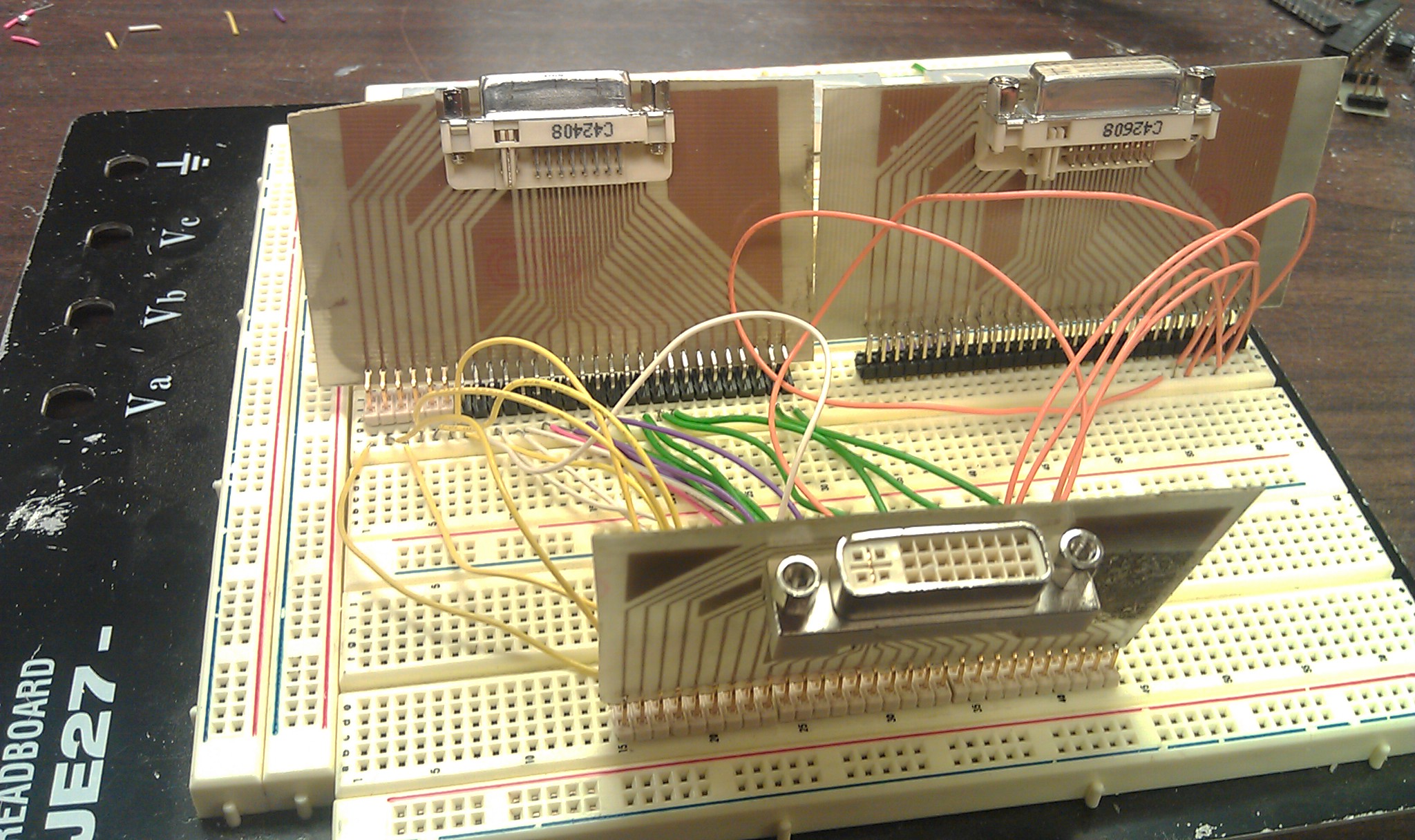
We’ve spent $0 and about 20 man-hours of labor so far. It would be less but my DipTrace and PCB etching skills are rusty. The boards took all day Saturday, 9/10 to design, etch, drill, solder, and test, but around midnight I got to check my first two hypotheses:
- Substitute the (6) data link 1 pins from our own source and connect all the rest from the Unifi 35
- Substitute the (6) data link 1 pins from our own source and TMDS shield/clock pins and connect all the rest from the Unifi 35
Sadly neither worked, but after some research on various protocols (see: EDID, DVI, TMDS, etc.), swapping additional pins may give us what we want.
If none of this pans out, we’ll probably look into faking the whiteboard signal. I’d hate to think the projectors are useless without the whiteboards. These things are just too cool to scrap.


Buy Milwaukee Makerspace shirts and stuff at our Zazzle store.


http://www.l-com.com/item.aspx?id=22411
You’ve made the pin out boards already, but I just wanted to show you these and specifically bring L-Com to your attention if you didn’t already know about them. I get their catalogs and emails. Lots of great equipment for techs and makers!
Aww man! Those are perfect for this. I wish I had seen them sooner. Thanks for the link!
from: http://www.techedu.com/Smart_SB660i_specs.asp
“Two USB A receptacles, one for USB storage device, linked to remote connection panel – one for USB link to interactive whiteboard.”
Got that from: http://www.techedu.com/Smart_SB660i.asp from googling “smartboard unifi 35″.
So that makes me think that some type of USB signal needs to come in to trip off the “Connect Whiteboard” warning. The simplest thing would be if the USB routing in the Whiteboard just looped a signal back or closed an open circuit. I wonder if just plugging in a printer cable could do it.
If not, L-Com also makes these:
http://www.l-com.com/productfamily.aspx?id=6564
and these: http://www.l-com.com/productfamily.aspx?id=6777
Good Luck!
Hi just got a unifi 35 been trying to get it working solo? did you ever manage to get your one going if so would u enlighten me,
Thanks merry xmas for over the pond co, antrin n.ireland
Not quite yet. It appears there’s a digital signal coming over the analog pins C1, C2, and so on. I’ve been planning to hook up a logic analyzer, but haven’t gotten around to doing so yet. I’ll let you know when I do! Thanks for the interest!
Since the projector is designed to work with a SMART Board it’s menu system is all touch based. So even if you get it fired up you will have an issue changing any of the settings, changing the input and adjusting the volume.
The error message you mention may be something they added to the later version of the firmware (2 or above), so have you tried downgrading the firmware to version 1.1 (you can find it on SMART’s website, just search for UF35 firmware).